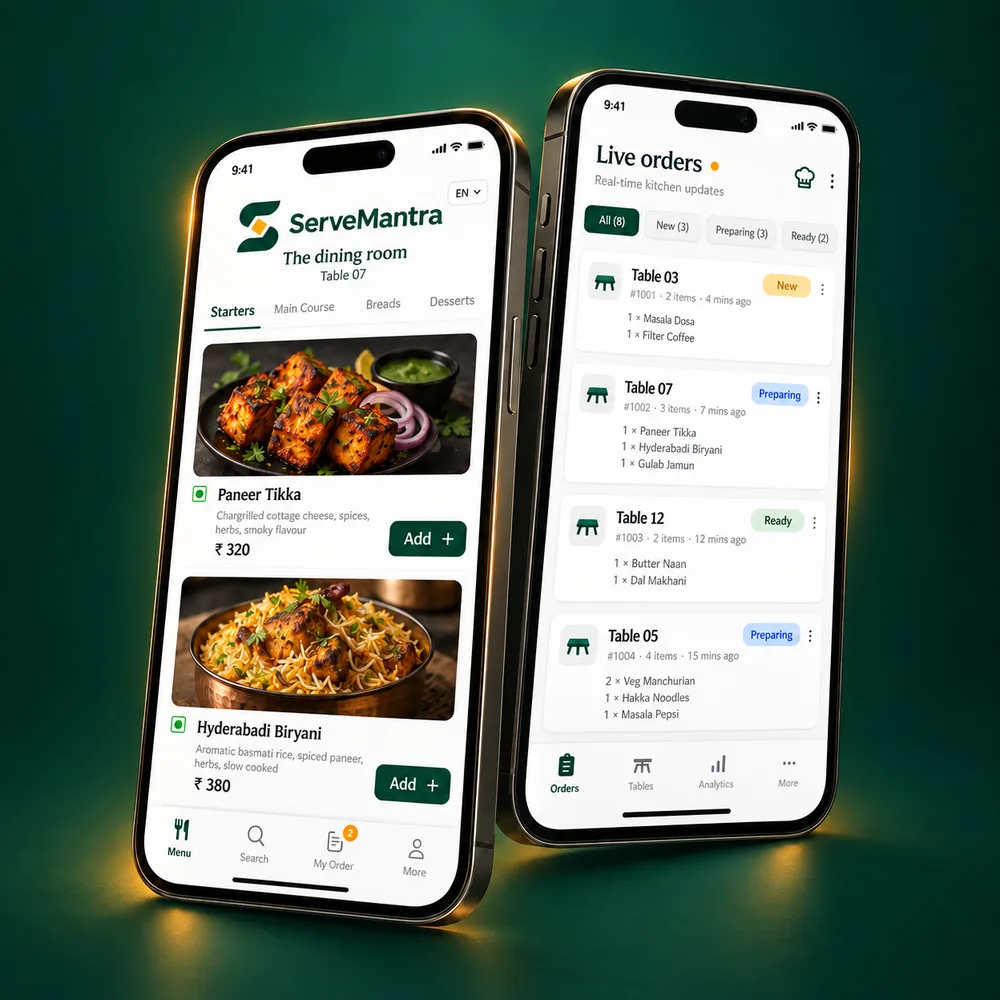
What can I use in ServeMantra today?
The available foundation covers OTP owner signup, dashboard restaurant setup, a unique public restaurant website page and a secure owner dashboard. A new owner enters a mobile number, receives a code and supplies only their name during verification. Restaurant name, city, state, order modes and service style come afterward on the dashboard, so the OTP does not expire while a longer form is being completed.
Menu importing, QR ordering, kitchen queues, checkout workflows and analytics are product-roadmap capabilities. They are described on the website so restaurants can understand the connected direction, but they are not presented as finished tools. Each phase will be introduced and tested without requiring a continuously running Node service or infrastructure that normal shared hosting cannot support.
Does every restaurant receive its own website page?
Yes. Completing the restaurant essentials creates a published page with a readable, unique address. The address combines a slug made from restaurant name, city and state with a six-digit identifier. For example, a restaurant called Swostik in Ambala City could receive an address following the pattern servemantra.in/swostik-ambala-city-haryana-123456. The final digits prevent conflicts when names or locations are similar.
The page is intended to provide a stable first-party destination for search engines and guests. As the product develops, it can present confirmed location details, service modes, contact information and published menu data. Suspended, archived, hidden or deleted restaurants are not meant to expose a public page.
Do customers have to install an app or log in to browse?
No. The planned customer experience is browser-first. Scanning a restaurant or table QR opens the digital menu directly, and browsing does not require installation or login. A guest verifies a mobile OTP only when choosing to start an order. This keeps casual menu discovery light while protecting ordering actions.
At a dine-in table, the first successfully verified guest becomes the order host. Other phones may continue to browse, but they cannot submit or alter the shared table order. This avoids competing carts and duplicate submissions. If the host loses access to the phone, restaurant staff can approve a transfer and immediately revoke the previous device’s ordering control.
Can one system suit table service and self-service restaurants?
ServeMantra is designed for table service, self-service and venues that combine both. In the planned table-service flow, guests may place multiple rounds while staff track accepted, preparing, ready and served items. In self-service, a pickup number and collected state are more useful. The dashboard setup records the restaurant’s chosen style so later tools can follow the right operational language.
The product is deliberately narrower than a full POS. It does not try to manage payroll, suppliers, inventory, delivery fleets or every financial process. Its focus is menu discovery, ordering, kitchen and service hand-offs, direct-payment support, exports and practical restaurant insights.
How will menu setup work?
The roadmap supports menu photographs, PDFs, spreadsheets, pasted text, rapid manual entry and copying between outlets owned by the same account. Automated extraction should reduce repetitive typing, but it must never publish without review. Owners check item names, categories, prices, variations, add-ons and uncertain details before anything becomes live.
Food photography remains optional. A restaurant should be able to launch a clean text-first menu and add images later. Dietary, allergen and spice information must come from restaurant-confirmed data rather than AI inference. Availability can be changed quickly, and future scheduling can reflect breakfast, lunch or dinner periods.
How do direct UPI and checkout work?
ServeMantra is not a payment gateway and does not promise automatic UPI verification. In the planned checkout flow, the restaurant first confirms accepted items, any restaurant-controlled discount or charge, and the final payable amount. The guest then sees an order summary and may pay at the counter or follow a direct UPI link or QR belonging to the restaurant.
If a guest submits a transaction reference or screenshot, the status remains “Payment Claimed — Verification Pending.” Only authorised restaurant staff can verify receipt and complete the table. The order summary is provided for convenience and is not a tax invoice; restaurants remain responsible for official invoices, taxes, accounting, refunds and statutory records.
What does the one-year trial include?
The launch strategy provides a one-year trial beginning when an owner creates the restaurant account. It lets early restaurants establish their foundation while further capabilities are introduced in phases. Trial start, end, status and plan are stored so the platform administrator can manage access or extend a trial where appropriate.
Historical restaurant data should not simply disappear when a trial ends. Exact future plan limits and paid subscription collection are outside the current MVP. The website will continue to distinguish available tools from product-roadmap descriptions rather than suggesting that every planned module is already part of the trial.
How are security and restaurant privacy handled?
Owner access uses mobile OTP with expiry, attempt limits, resend cooldown, number and IP throttling, hashed codes and single-use verification. State-changing requests use CSRF protection, sessions use secure cookie settings under HTTPS, and important actions can be recorded in audit logs. Secrets such as database credentials and OTP API keys belong outside the public web root and never in browser JavaScript.
Restaurant-level access is checked on the server for multi-tenant queries. Prepared statements, input validation and escaped output reduce common risks. Private uploads such as menu sources or payment screenshots are intended to use generated names and authorised delivery rather than predictable public links. Security is a continuing engineering responsibility, not a badge added at launch.
Where should I start?
If you are evaluating the concept, read How it works for the end-to-end journey and Features for current and planned capabilities. The Guides library offers practical material on QR menus, local discovery and restaurant reporting even if you have not joined ServeMantra.
When you are ready, create the owner account with your mobile number and name. After verification, the dashboard asks for restaurant essentials and creates the unique restaurant page. This order keeps OTP signup quick and lets you complete business details without racing a countdown.